Turn every enquiry into a next action. Keep the full customer story together.
Connect customers, calls, WhatsApp conversations, quotations and follow-ups in one CRM, so sales and service teams always respond with context.
- A shared timeline for calls, messages, notes and service history
- Quotations and opportunities tracked from follow-up to outcome
- AI messaging and mobile CRM for faster customer response

One Connected Platform for the Whole Customer Relationship
iCRM covers far more than contacts and quotations. Start with the customer and sales core, then switch on the modules that fit the way your business runs — every module works from the same customer record.
Customer & Revenue
- Customer CRMContacts, groups, sources, billing, follow-ups and team assignment.
- QuotationsStatus, layouts, item closing rates, email delivery and approvals.
- Membership & RecurrenceMember categories, statuses, recurrence and expiry reminders.
- Marketing CampaignsCustom campaigns with Google and Facebook ads reporting.
Operations
- Service RecordsProcesses, case chains, product problems, alerts and dashboards.
- Items & InventoryComplex items, flexible prices, serials, batches and stock insight.
- AppointmentsShared activity calendar, reminders and scheduled delivery.
- Assets & RenewalsDomains, licences and other important renewal obligations.
People & Learning
- Employee ManagementComplete records, employee types, files, groups and self-service.
- Corporate WorkspaceOrganisation, digital assets, credentials and shared calendar.
- Group PermissionsRole-based employee access down to individual menu pages.
- Training & KPIQuestion banks, assessment sets, assignment and marking.
- Tuition & ClassesClasses, students, tutors, attendance, fees and parent communication.
Engagement
- Omnichannel MessengerWhatsApp, SMS, email, campaigns, schedules and reminders.
- Facebook Messenger CRMShared Facebook Page inbox, CRM contact linking and searchable history.
- AI Chat AssistantAI response, live-agent handover, analytics and chat history.
- BizCloud Mobile AppAndroid and iPhone access for service records, analytics, alerts and replies.
- AlienVoIP AnalyticsCloud PBX, call history, agent KPI and capacity insight.
Ecosystem
- Events & AttendanceRecurring events, QR registration, attendance and payments.
- Tutor Companion AppsPortal login, payments, attendance and interactive learning.
- Vendor ManagementApproved suppliers, item relationships, files, TIN and MSIC.
AI Answers the Routine. Your Team Closes the Rest.
Messages arrive around the clock on WhatsApp, SMS and email. The AI assistant handles the repetitive ones instantly, and hands over the moment a person is needed.
1. A message arrives
WhatsApp, SMS or email lands in the shared inbox, matched to the customer record it belongs to.
2. AI answers instantly
Routine questions get an accurate reply from your own knowledge base, in under one second, any hour of the day.
3. An agent takes over
When the conversation needs a person, it is handed to your team with the full chat history already attached.
Your CRM, In the Pocket of Everyone Who Visits Customers
The sale does not happen at your desk, so the CRM should not live there either.
Works where your customers are
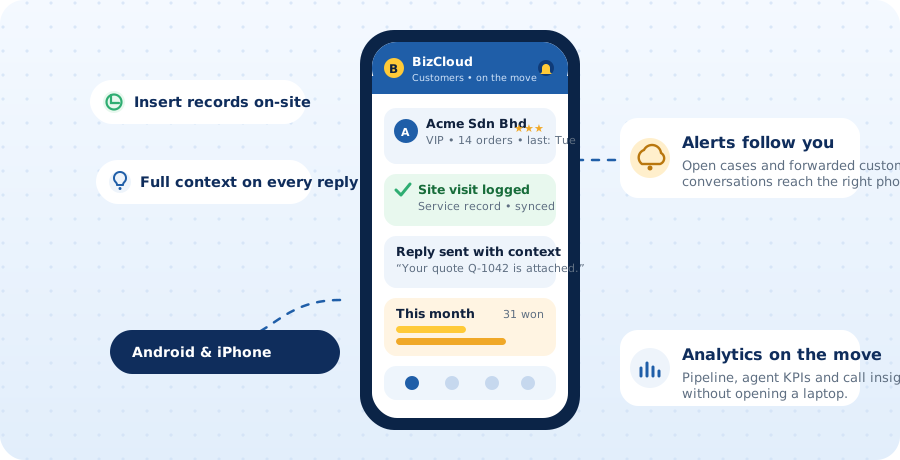
The BizCloud app for Android and iPhone keeps the customer record with the people in the field: check the history before walking in, log the visit before driving off, and reply to the next message with everything already in view.
- Insert service records on site, synced to the office instantly
- Customer history and quotations in view before every meeting
- Alerts and forwarded conversations reach the right person's phone
- Reply to customers with full context, from anywhere
- Pipeline and agent KPIs on the move, no laptop needed
Where It Meets Your Phone System
The difference between a customer list and a customer conversation.
The record opens before you say hello
When a customer calls, their number is matched to the CRM record, so whoever answers can see who it is, what they last bought, and what was promised the last time they spoke.
- Calls logged against the customer automatically
- WhatsApp conversations kept in the same history
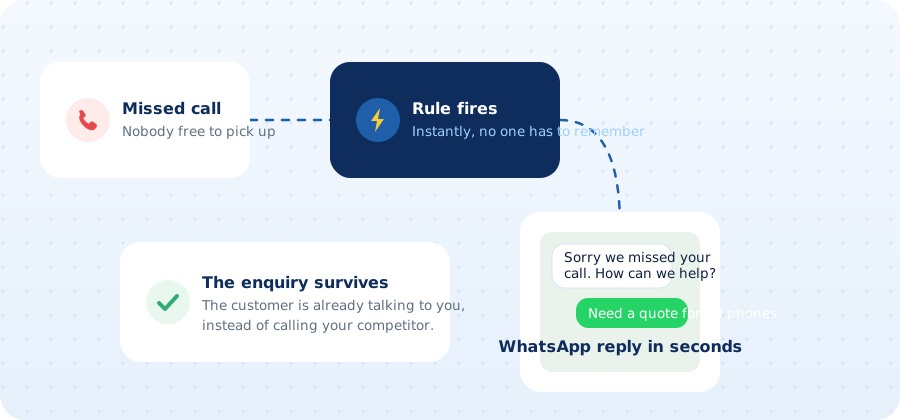
- Missed calls can become follow-up tasks instead of lost enquiries
Getting Started
- Show us your sales flowHow enquiries arrive, who quotes, and where things currently get dropped.
- Bring your customer listWe review your spreadsheet or export and advise what imports cleanly.
- We set it upStages, quotation format, users and reminders configured for your team.
- Connect the callsLink the phone system and WhatsApp so history lands on the record.
Pairs Well With
A CRM earns its keep when the conversations reach it. Most customers run it alongside WhatsApp Business API and their Cloud PBX.
Request a CRM Demo & Quote
Tell us how many people sell or handle enquiries, and where things currently fall through. We will show you how it would work for your team.
Prefer to talk it through? WhatsApp our team.
- A walkthrough based on your own sales flow
- Advice on importing your existing customer list
- Call and WhatsApp history connected where possible
- No obligation
Plan My CRM Demo
CRM FAQ
Can the CRM show who is calling?
Yes, where your phone system supports it. The caller's number is matched to a customer record, so your team can see who it is, what they bought and what was last discussed, before they say hello.
Do WhatsApp conversations get saved to the customer?
With the WhatsApp Business API in place, conversations can be kept against the customer record, so the next person to deal with them can see what was already promised.
Can we move our existing customer list in?
Usually yes. Send us your spreadsheet or an export from your current system, and we will review the fields and tell you what can be imported cleanly.
Can AI answer customer messages for us?
Yes, for the routine ones. The AI chat assistant replies to common questions on WhatsApp, SMS and email using your own knowledge base, in under a second, at any hour. When a conversation needs a person, it is handed to your team with the full chat history attached, and everything stays on the customer record.
Is it suitable for a small sales team?
Yes. It is built for SME teams: a handful of salespeople who need to stop losing enquiries and remember to follow up, not a large enterprise rollout.